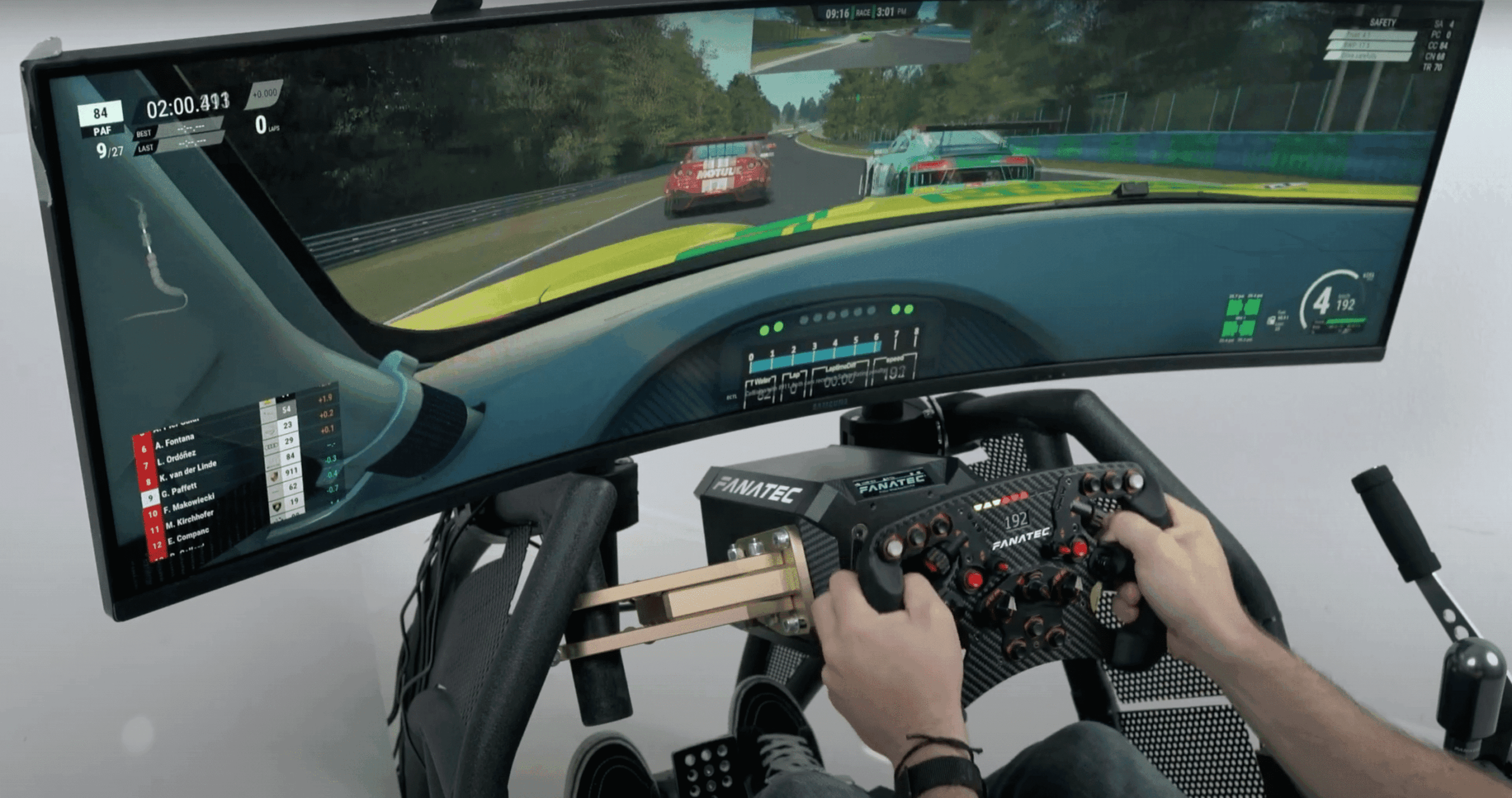
Fanalab is een – voormalige – intuïtieve en geavanceerde softwaretool van Fanatec die de race-ervaring naar nieuwe hoogten brengt voor enthousiaste sim racers. Fanatec heeft onlangs deze populaire tuning-software omgedoopt tot de nieuwe Fanatec App.
With a wide range of customisable features and real-time telemetry, Fanalab offers a refined and personalised experience for Fanatec users. In this article, we will take a closer look at Fanalab's features, compatibility, as well as how to set it up for optimal performance, so you can get the most out of your Fanatec gear!
What is Fanalab?
Fanalab is advanced software developed by Fanatec, one of the best-known hardware manufacturers. This innovative software is designed to enhance the performance of your sim racing setup by providing a wide range of customisation options, telemetry data and advanced settings. With Fanalab, you can exploit the full potential of your Fanatec racing equipment. Whether you use a racing wheel, pedals or a combination of accessories, Fanalab offers unparalleled control over your gaming hardware.

Maximise your performance with Fanalab
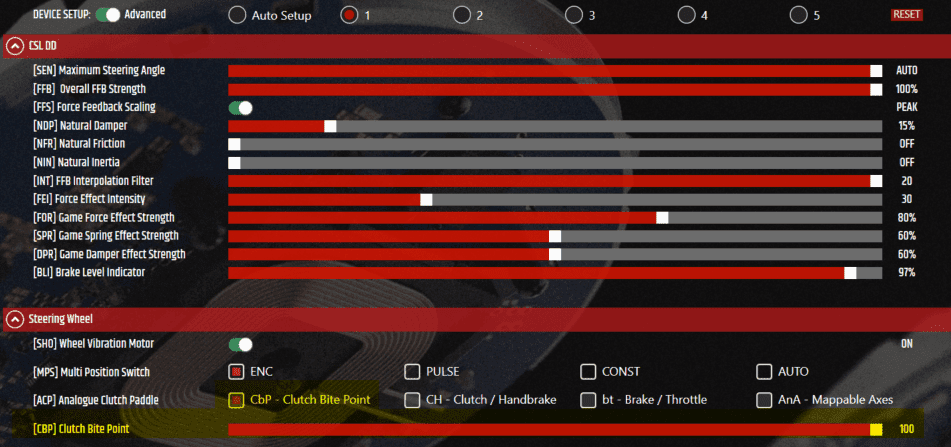
- Adjusting your Settings: Fanalab allows you to fine-tune various settings, such as force feedback, sensitivity and pedal tuning, to suit your personal preferences and driving style. This level of customisation makes for a more immersive and responsive racing experience.
- Telemetry data analysis: By providing detailed telemetry data, Fanalab allows you to analyse your driving performance, monitor crucial statistics and make data-based improvements. You can view lap times, throttle inputs, braking points and other vital information to optimise your racing strategy.
- Advanced Stuura tuning: Fanalab offers advanced handlebar tuning options, allowing you to adjust parameters such as steering angle, damper settings and vibration feedback. These precise adjustments allow you to tailor your racing wheel to your specific needs, giving you a competitive edge.
Setting Fanalab
Setting up and running Fanalab is very easy. In just 4 steps, you will have this software up-and-running! Want to get the most out of Fanalab? Then check out the starters guide video below!
1. Fanatec Software download
The very first step is to download the Fanalab software. Click here to download the latest software version.
2. Fanatec Software installation
To start using Fanalab, you must first install the software on your computer. Follow the on-screen instructions to complete the installation.
3. Connecting devices
Once the software is installed, connect your Fanatec wheelbase, steering wheel and other peripherals with your computer. Make sure all necessary drivers are correctly installed to ensure trouble-free communication between the devices and the software.
4. Configure settings
After connecting your devices, open Fanalab and go to the settings menu. Here you can adjust various parameters to suit your personal preferences. Experiment with force feedback settings, pedal response and other options to create the ideal racing experience.
Advanced settings and optimisations
Fine-tuning force feedback
Force feedback is an essential part of the racing experience. Fanalab lets you fine-tune force feedback settings to fine-tune steering response and feedback from road conditions. By experimenting with the settings, you can find a balance that suits your driving style and preferences.
Adjusting pedal feel
The sensitivity of your brake, accelerator and clutch pedals can make a big difference in car control. Fanalab offers the ability to adjust pedal response to perfectly suit your preferences. Increase or decrease sensitivity and braking force to achieve optimal brake balance and better lap times.
Customising button layout
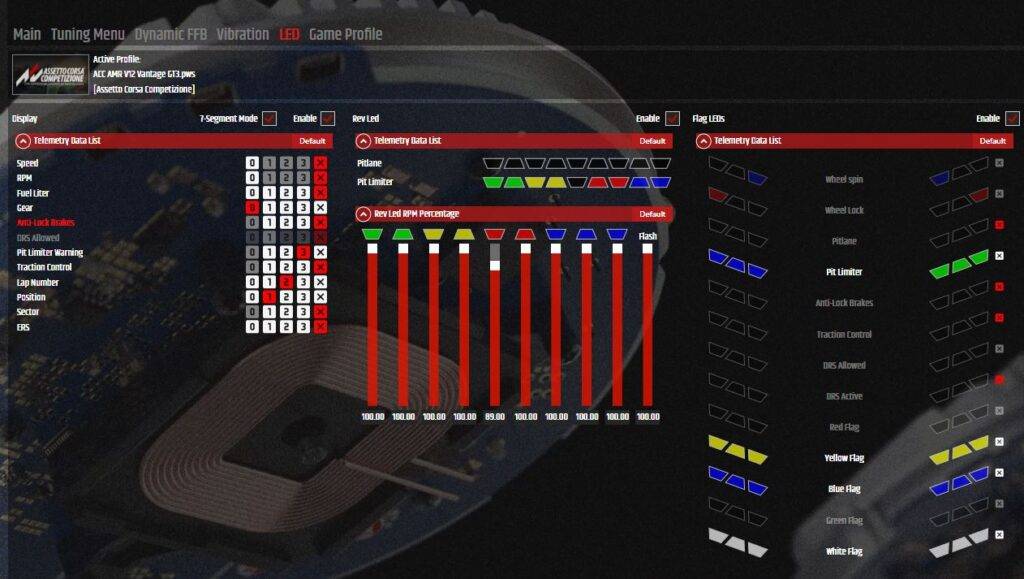
Fanatec wheelbases and steering wheels have an array of buttons and switches that allow you to control various functions while racing. Fanalab lets you customise the button layout so you can easily access the functions you want without losing concentration. For example, assign the pit limiter, clutch or tyre and fuel settings to the desired buttons.

Conclusion: Optimise your Simrace adventures with Fanalab
Fanalab is a powerful software solution that is the key to unlocking the full potential of your sim racing experience. With the ability to adjust your settings, analyse telemetry data and optimise your racing equipment, Fanalab offers an unparalleled degree of control and personalisation.
Whether you are a seasoned sim racing veteran or just starting your virtual racing adventures, Fanalab allows you to take your gameplay to the next level. Discover the power of Fanalab and immerse yourself in the exciting world of sim racing with enhanced performance and an unparalleled racing experience. So what are you waiting for? Get started with Fanalab today and unlock the full potential of your Fanatec hardware.
Frequently asked questions about Fanalab
1. How do I install Fanalab?
Installing Fanalab is a simple process. Simply download the software from the official Fanatec website, run the installation file and follow the on-screen instructions. Once it is installed, you can connect your Fanatec racing equipment to your computer and adjust your settings.
2. Can I use Fanalab with other racing accessories?
Fanalab is primarily designed to work seamlessly with Fanatec racing equipment. While it may be compatible with other racing accessories, you will experience full functionality and optimisation best with Fanatec products.
3. Does Fanalab support multiple gaming platforms?
No, Fanalab is only compatible for PC.
4. Can I save and share my Fanalab settings or Fanalab profiles?
Absolutely! Fanalab allows you to save and share your custom settings or Fanalab profiles with other sim racing enthusiasts. This feature allows you to exchange setups, learn from others and improve your overall gaming experience.
5. Does Fanalab require constant internet connection?
No, Fanalab does not require a constant internet connection. It is a local software application that runs on your own computer, allowing you to enjoy your sim racing experience without interruptions.
6. Is Fanalab suitable for beginners in the sim racing world?
Absolutely! Fanalab offers customisable options suitable for both beginners and experienced sim racing enthusiasts. You can adjust the settings to your level and preferences, giving you a comfortable and immersive sim racing experience regardless of your skill level.
Have any thoughts?
Share your reaction or leave a quick response — we’d love to hear what you think!
-
 0
0
-
0
-
0
-
0
-
0
-
0


 Nederlands
  Deutsch
  English (UK)
  Français