The new Simucube Tuner 3.0 marks an important milestone in the development of the Simucube ecosystem. This long-awaited update goes far beyond a simple facelift: it brings a completely revamped visual experience, deeper integrations with existing and future hardware, and a user-friendly approach that will appeal to both novice and seasoned sim racers. In addition, the software is technically fully prepared for the arrival of Simucube 3 and provides a powerful bridge to the ever-expanding Simucube Wireless Wheel ecosystem.
Visual upgrade and user-friendliness: the new interface
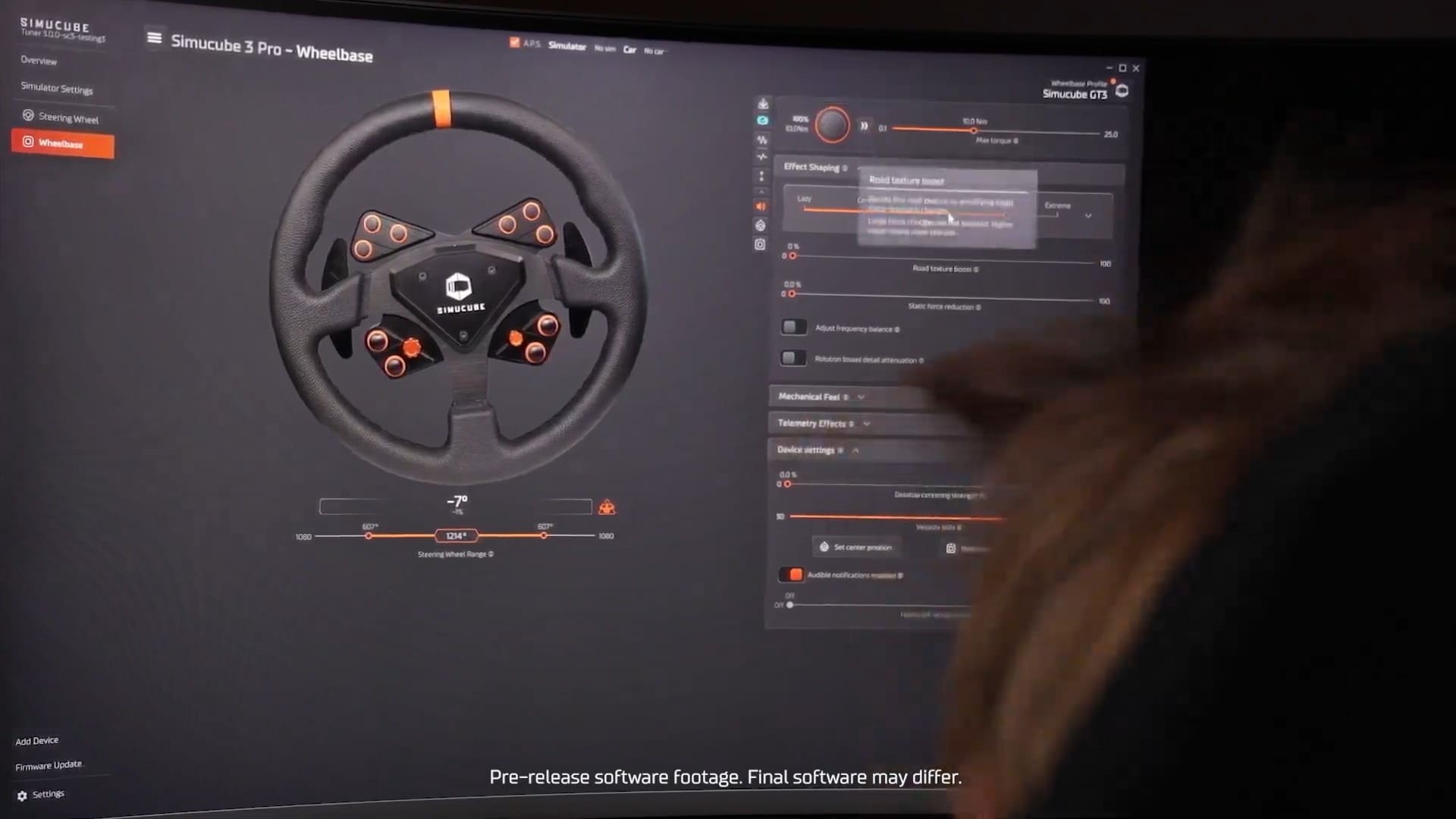
When you open Simucube Tuner 3.0, the revamped design immediately catches the eye. The interface has been completely redesigned and now has a sleek, modern look. Not only does it look better, it also works more intuitively. Menus are grouped more clearly, settings are easier to find, and the whole thing feels much more responsive. For users who spend a lot of time in their setup, this is a relief: fewer clicks, more racing.
The user interface was developed with input from testers and the community, which is clearly evident in the choices that were made. Examples include improved sliders, better visualisation of active settings, and dynamic feedback that shows you in real time what effect a change will have.
Prepared for the future: support for Simucube 3
One of the biggest changes behind the scenes is the preparation for the next generation of hardware: Simucube 3. Although not all details are known yet, it is certain that these future wheelbases will use a faster communication bus and more extensive functionalities that work closely with Tuner 3.0. The software already supports new protocols and integration points, allowing users to benefit immediately as soon as the new hardware becomes available.
For those who are already using a Simucube 2 Sport, If you are using Pro or Ultimate, this means you can confidently upgrade to the latest software without worrying about compatibility. The transition is straightforward and offers immediate benefits in terms of speed, stability, and configuration options.
Seamless collaboration with Simucube Wireless Wheels
An important focus of this update is improved communication with Simucube Wireless Wheels. With the introduction of the Link Wheel Module the connection between the controller and base will not only be faster, but also more reliable and richer in functionality. This includes direct feedback for buttons and LED indicators, faster connections when switching controllers, and an overall more stable experience.
In addition, Tuner 3.0 offers the ability to easily switch between different steering wheels while retaining specific profiles. This makes switching from a GT to an F1 steering wheel literally plug-and-play, without the hassle of recalibrations or custom mappings.
More than a configuration tool: a central part of your ecosystem
Simucube Tuner 3.0 transcends the traditional idea of a configuration tool. It has now become an integral part of your sim racing ecosystem. The software automatically recognises the game you are playing and adjusts settings as desired. You can create multiple profiles for different disciplines (e.g. rally, endurance or sprint) and load them quickly via a clear dashboard.
The ability to share presets with other users has also been greatly improved. You can now easily export, import, and even search online communities where users share settings. Ideal for those who don't want to start from scratch or are looking for quick inspiration for certain circuits or vehicles.

Under the bonnet: faster communication and smarter installation
In addition to the external changes, significant improvements have been made to performance under the bonnet. The communication layer between software and hardware has been rewritten for faster data transfer. The software responds more quickly, settings are applied almost instantly, and error messages are clearer.
The installation process has also been simplified: fewer steps, clear prompts, automatic detection of existing settings and an improved recovery process in case of connection problems. In addition, attention has been paid to visual assistance within the app, such as interactive tips and a quick start guide.
Looking ahead: the roadmap for Simucube Tuner 3.0
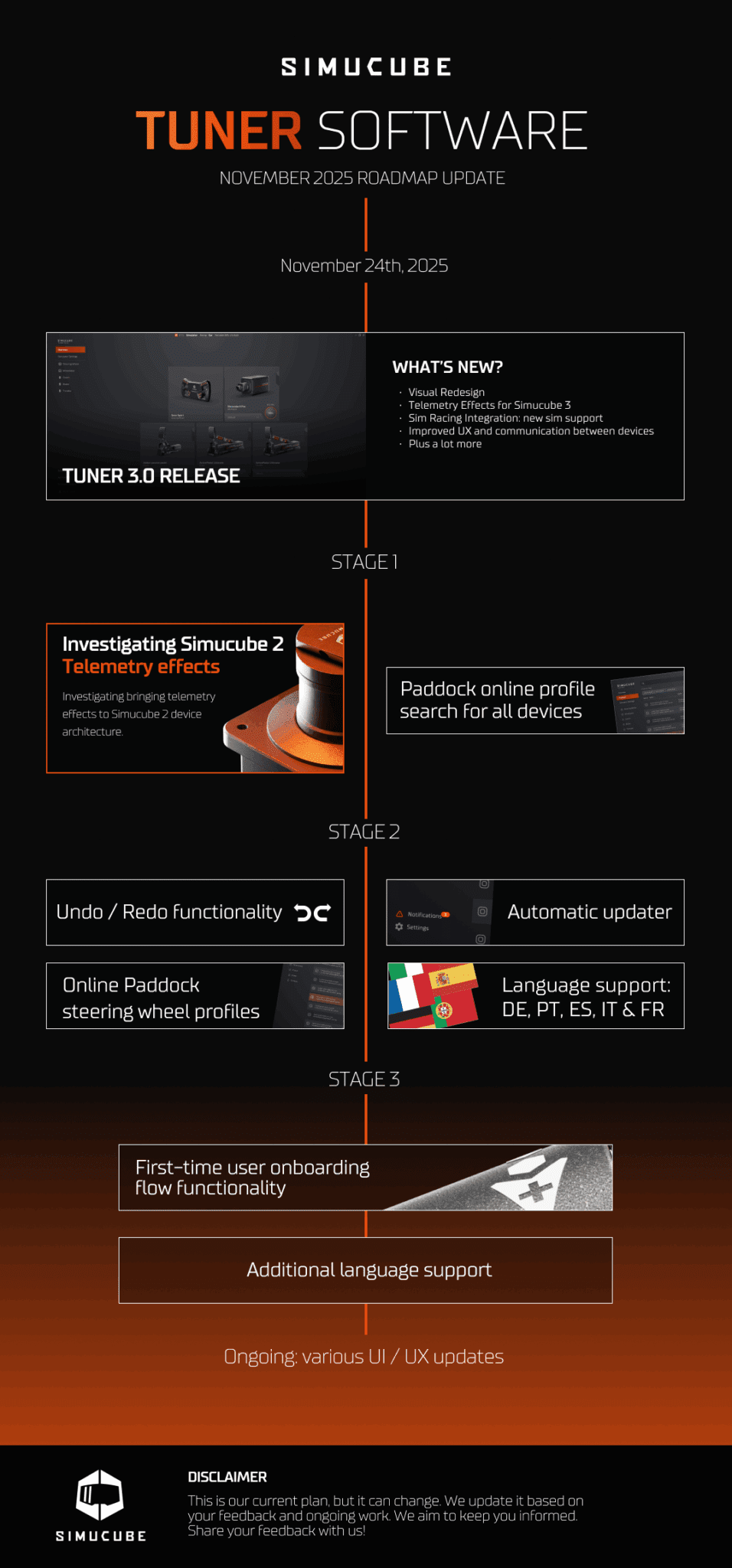
The current version of Simucube Tuner 3.0 is just the beginning. According to the roadmap A number of interesting features and enhancements are planned:
- Improved auto-detection of games: so that profiles can load automatically when specific simulations are started.
- Online synchronisation and cloud profiles: create backups and synchronise settings across multiple devices.
- Advanced user roles: consider an ‘expert mode’ with additional settings for advanced users, alongside a ‘simple view’ for beginners.
- Deeper API integration with sim racing platforms: such as iRacing, Assetto Corsa, and rFactor 2, to automatically adjust settings based on circuit or vehicle.
- Firmware updates via the cloud: perform updates more easily, quickly, and securely.
Simucube has clearly expressed its ambition to further develop Tuner 3.0 into an all-in-one platform that gives users complete control over their ecosystem.
What does this mean for you as a sim racer?
For both current Simucube 2 users and future Simucube 3 users, this software update is a no-brainer. You'll get more out of your existing hardware, bridge the gap between software and reality, and prepare your setup for what's to come. Improved stability, faster response times, and deeper integration with accessories deliver an immersive sim experience that brings you closer than ever to real racing.
Further information and official sources
Are you curious about future plans, exact features or technical details? Then read the full roadmap and announcement on the official Simucube website.
Frequently asked questions about Simucube Tuner 3.0
Is Simucube Tuner 3.0 compatible with Simucube 2 Pro and Sport?
Yes, the new software is fully compatible with all versions of Simucube 2, including the Sport, Pro, and Ultimate variants.
When will the Simucube 3 wheelbase be released?
No exact release date has been announced yet, but Tuner 3.0 is already fully prepared for the integration of this new generation of hardware.
Do I need to manually upgrade to Tuner 3.0?
Yes, the upgrade requires a separate installation and will not be rolled out automatically via the old software. Please follow the clear steps on the Simucube website to make the switch.
What exactly is the Link Wheel Module?
This new module forms the link between wireless steering wheels and the base, enabling faster, more reliable and richer communication. This further minimises latency and connection issues.
Will my old profiles be retained?
In most cases, existing profiles can be easily transferred to Tuner 3.0. However, it is strongly recommended that you make a backup beforehand, in case settings are not read correctly.
Is Tuner 3.0 suitable for beginners?
Absolutely. The new interface and improved user experience make it easier than ever to adjust your settings, without requiring in-depth technical knowledge.
Have any thoughts?
Share your reaction or leave a quick response - we'd love to hear what you think!
-
 0
0
-
0
-
0
-
0
-
0
-
0


 Nederlands
  Deutsch
  English (UK)
  Français